WhatsApp usCall us

Why Odoo

A plain explanation for business owners. No technical background needed.

What Odoo is

01Odoo is business software made by Odoo S.A., a company based in Belgium. Companies around the world use it to run sales, stock, purchasing, accounting, HR and more.

02It's what people call an ERP system. That means one system where every department works on the same data. When sales issues an invoice, accounting sees it. When the warehouse ships an order, stock goes down. Nobody types the same thing twice.

03Odoo comes as separate apps that fit together. You pick the ones you need and add more later.

Inside the system

Your numbers on one screen

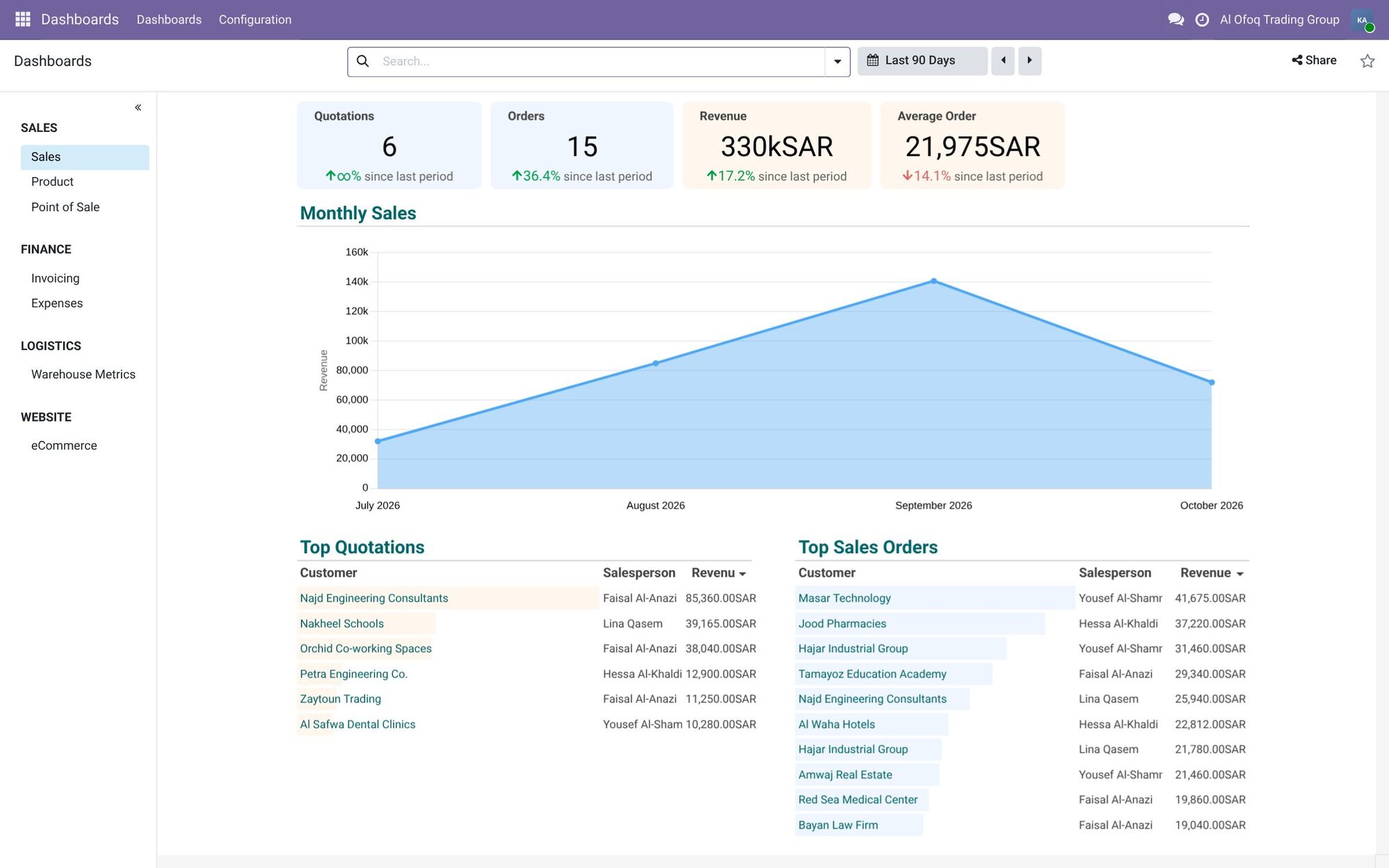
Sales, orders and revenue sit on one dashboard and update as each transaction is recorded. No more collecting figures from scattered files.

The Sales dashboard in Odoo 19: quotation, order, revenue and average-order tiles, a monthly sales chart, top quotations and top orders.

A day in your company

The problems it solves

  • Excel sheets everywhere

    Every department keeps its own file. Versions get mixed up, formulas break, and when someone leaves, their file leaves with them. In Odoo, everyone works on the same records, and you can see who changed what.

  • Programs that don't talk to each other

    The accounting program doesn't know what the warehouse shipped. The POS doesn't know what purchasing ordered. So someone copies numbers between them by hand, and mistakes creep in. In Odoo, one action updates every app that needs it.

  • No clear numbers

    Ask how much stock you have, who owes you money, or which product actually makes a profit, and the answer is 'give me a day'. Odoo shows these answers on screen, from live data.

  • Everything depends on a few people

    When only one person knows how invoicing works or where the price list is, work stops when they're off. In Odoo, the steps live in the system, so new staff learn faster.

What you get

  • Fewer manual steps

    A confirmed sale can create the delivery, the invoice and the stock update. Your team stops doing the same work twice.

  • Decisions on today's numbers

    Dashboards and reports show sales, cash, stock and overdue payments as they are now.

  • Control over who sees what

    Each user sees only their part of the business. You can require approval for purchases above a set amount.

  • Room to grow

    Add users, branches, companies or apps as you grow. You keep the same system and the same data.

What you get

  • Fewer manual steps

    A confirmed sale can create the delivery, the invoice and the stock update. Your team stops doing the same work twice.

  • Decisions on today's numbers

    Dashboards and reports show sales, cash, stock and overdue payments as they are now.

  • Control over who sees what

    Each user sees only their part of the business. You can require approval for purchases above a set amount.

  • Room to grow

    Add users, branches, companies or apps as you grow. You keep the same system and the same data.

  • Arabic and English

    Each user works in the language they prefer. The Arabic screens read right to left.

  • Local rules covered

    Odoo has ready setups for Saudi and Jordanian accounting, with local taxes and e-invoicing.

Community or Enterprise?

Odoo comes in two editions. Both share the same base, and you can move from Community to Enterprise later.

Community

The free, open-source edition. There's no license fee, but you still pay for setup, hosting and support.

  • No per-user fee
  • Covers sales, CRM, purchasing, inventory, manufacturing, invoicing, POS, website, projects and basic HR
  • Runs on your own server or a cloud server you rent
  • Some apps are missing, like full accounting reports, payroll and Studio

Enterprise

The paid edition. You pay a subscription per user, and you get more apps and more features inside each app.

  • Full accounting with financial reports and bank reconciliation
  • Payroll, Studio, Barcode, Quality and other extra apps
  • Can run on Odoo's cloud, on Odoo.sh, or on your own server
  • Version upgrades included in the subscription

The right edition depends on the apps you need and how many people will use the system. We compare both for your case in the consultation.

Cloud or your own server

  1. Odoo Online

    Odoo hosts it for you. It's quick to start and there's no server to manage. Enterprise only, and it doesn't allow custom code, so it suits companies that use standard features.

  2. Odoo.sh

    Odoo's cloud platform for companies that need custom development. Enterprise only.

  3. Your own server

    In your office or on a cloud server you rent. Works with Community or Enterprise. You control everything, and someone has to look after the server.

When Odoo is not the right fit

Odoo fits a lot of companies. Not all of them. We'd rather tell you now than after you've paid.

  • You only need simple invoicing

    If you're a small team with a few invoices a month and no stock, a simple accounting program may be enough.

  • Nobody on your side can own the project

    Odoo needs someone in your company who makes decisions and gets the team to use it. Without that person, the project stalls.

  • Every old habit must stay the same

    Odoo works best when you adjust some steps to its way of working. If every process has to stay exactly as it is, customization costs grow fast.

  • Your sector runs on specialized software

    Hospitals, banks and insurance companies usually rely on systems built for their field. Odoo can work next to that software, but it may not replace it.

If one of these sounds like you, tell us in the consultation. We'll say it straight, even if the answer is that you don't need Odoo.

Not sure yet?

Book a free consultation. We'll look at how you work today and tell you if Odoo makes sense.